SERP Features: Meaning, Examples, and How to Win Them in Your Niche

SERP features appear on search engine results pages beyond the organic search results. Search engines like Google design these features to provide users with more direct, varied, and interactive ways to find the information they seek. Unlike the standard blue-link search results, SERP features can include graphical elements, interactive widgets, and specialized data presentations.
These features are generated based on the search engine’s understanding of the user’s intent and the nature of the query. They aim to enhance the user experience by offering more than just a list of links, such as direct answers, related images or videos, or a more structured presentation of information.
15 SERP Feature Examples Relevant for Different Niches
Here are 15 SERP features that can impact your brand visibility in search results.
1. AI Overviews
Google AI overviews are AI-generated summaries that appear at the top of search results — even above featured summaries and ads. These overviews pull content from different web pages to provide the exact information the user is searching for. They mostly appear for simple, informational queries that need a straight-to-the-point answer.
You need an AI overview tracker like Keyword.com to see which keywords trigger AI overviews and whether your content is referenced in AI search results.
Learn more: How to track Google AI overviews
How to Appear in Google AI Overviews
Here is how to improve your website’s chances of ranking in Google AI search results.
- Provide specific, well-formatted answers to long-tail keywords
- Optimize your content for information gain
- Implement SEO structured data
Learn more: How to rank in Google AI overviews
2. Featured snippets
A featured snippet, often called “Position 0” in SERPs, is a concise summary of information displayed at the top of the search results. This highlighted snippet is intended to answer a user’s query directly, providing a quick and relevant response without the need to click through to a specific website.
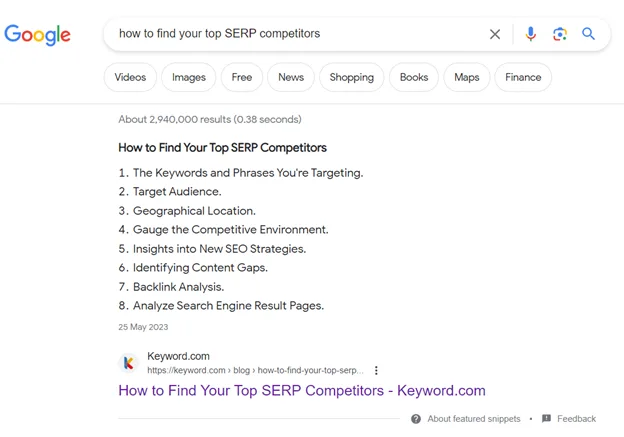
Depending on the nature of the search query, featured snippets come in various formats, including paragraphs, lists, tables, and more.
How to Appear in Featured Snippets
To appear in featured snippets:
- Find snippet opportunities: identify keywords with existing snippets using SEO tools.
- Match the snippet format: use paragraphs, lists, or tables based on Google’s preference.
- Provide a clear, direct answer: keep it concise (40-60 words for paragraph snippets).
- Use structured formatting: bold headings, bullet points, and H2/H3 tags help.
- Optimize existing content: improve clarity and formatting, and add FAQs for better chances.
3. People Also Ask
The People Also Ask (PAA) feature provides users with additional questions about their initial search query. This feature aims to answer further questions that searchers might have based on related queries. The PAA box usually appears among the top search results and can sometimes shift position based on the relevance and context of the search.
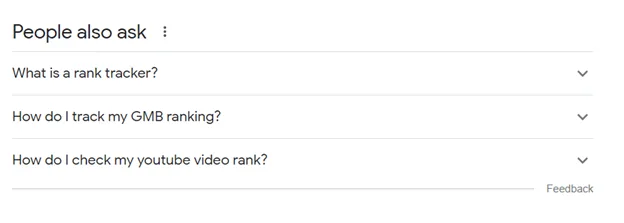
Each question within the PAA box can be clicked to reveal a brief answer, typically extracted from a webpage, along with a link to the source. The answers are often in a short snippet—a paragraph, list, or table.
How to Rank for People Also Ask
To rank for People Also Ask (PAA) boxes, follow these steps:
- Search your target keyword and note the PAA questions that appear.
- Use a question as an H2 or H3 and answer it immediately.
- Expand content by covering multiple related PAA queries in a single post.
- Add an FAQ section to increase relevance.
4. Image Pack
An “Image Pack” is a feature in search engine results pages where a row or a grid of images displays in response to a search query. This feature is triggered when search engines determine that visual content would be particularly useful or relevant to the search. The images in an Image Pack are typically pulled from various websites and are directly linked to the source pages where those images are featured.
How to Appear in Image Pack Results
To appear in Google image pack results:
- Use high-quality, relevant images that match search intent.
- Name files descriptively (e.g., seo-ranking-factors.jpg instead of IMG123.jpg).
- Use keyword-rich, descriptive alt text for accessibility and SEO.
- Implement ImageObject schema markup to help Google understand the image.
- Ensure the page containing the image is optimized for SEO.
5. Knowledge Panel
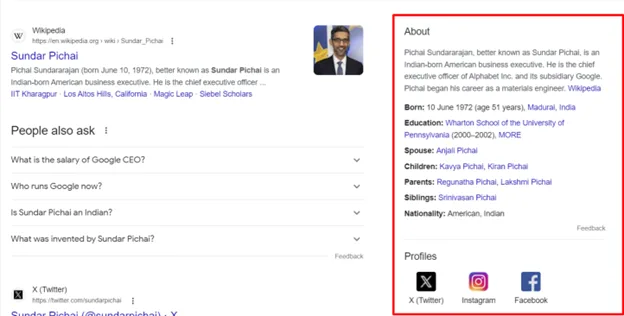
A Knowledge Panel provides a summarized information box about a specific entity, such as a person, place, organization, or thing. The Knowledge Panel appears on the right-hand side of the search results page and is intended to offer users quick and essential details without visiting multiple websites.
How to Trigger Knowledge Panel for Your Brand
- Create a Wikipedia page: Google pulls Knowledge Panel data from Wikipedia.
- Claim a Google Business Profile: essential for local businesses to appear in panels.
- Use structured data: implement Organization schema markup on your site.
- Get listed on trusted sources: ensure your brand appears on Crunchbase, Wikidata, LinkedIn, and industry directories.
- Be consistent online: use the same brand name, logo, and descriptions across platforms.
6. Local Pack
Local Packs, often referred to as “Local 3-Packs,” display local business listings relevant to a user’s search query, particularly those with local intent (like “coffee shops near me” or “car repair in New York”).
How to Trigger Google Local Pack
- Claim and optimize your Google Business Profile: ensure accurate business info, categories, and keywords.
- Get local citations: list your business on Yelp, Bing Places, Apple Maps, and industry directories.
- Encourage customer reviews: more positive Google reviews improve rankings.
- Optimize for local keywords: use city + service phrases in your website and GBP description.
- Ensure NAP consistency: Your Name, Address, and Phone Number should match across all platforms.
Learn more: How to optimize your Google Business Profile
7. Sitelinks
Sitelinks show additional links from a website directly beneath its main search results. These links help users navigate to relevant or popular website sections quickly without having to manually click through the homepage and look for those pages.
How to Make Google Show Sitelinks for Your Website
- Use a clear site structure: organize pages with a logical hierarchy and internal links.
- Create descriptive navigation: use clear, keyword-rich menu labels.
- Use structured data: implement BreadcrumbList schema to help Google understand your site.
- Submit an XML sitemap: ensure Google indexes your key pages properly.
- Rank for branded searches: strong brand authority increases sitelink chances.
8. Top Stories
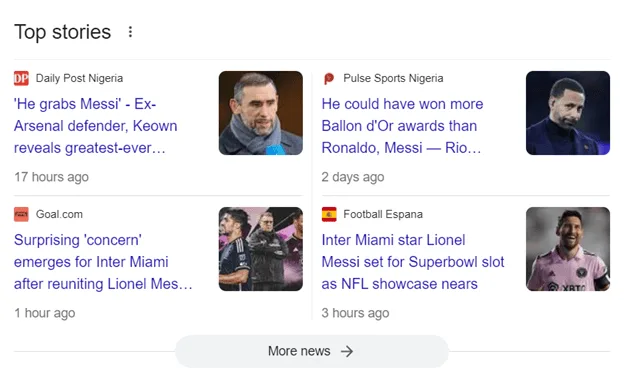
Top Stories highlights the latest and most relevant news articles related to a particular search query. When users search for a current event, trending topic, or news-related query, Google may display a dedicated section at the top of the search results page, showcasing a selection of news articles known as “Top Stories.”
9. Rich Results
Rich results provide additional data about a webpage’s content beyond the standard title, URL, and meta description. They are designed to give users a better sense of what’s on the webpage and why it’s relevant to their query. Depending on the page’s content, rich results can include star ratings, images, product prices, availability, review counts, author information, or other specific data types.
How to Make Rich Results Appear for Your Web Pages
- Use structured data: implement Schema.org markup (e.g., FAQ, How-To, Product, Review).
- Validate with Google’s Rich Results Test: ensure your markup is correctly implemented.
- Improve page quality: fast load times, mobile-friendliness, and good UX help.
- Use compelling meta descriptions: encourage higher CTR, signaling relevance.
- Submit an updated XML sitemap: it helps Google crawl and index your structured content faster.
10. Flights
A “Flight” SERP feature is explicitly designed for queries related to air travel. When a user searches for flight-related information, such as specific flight routes (“New York to London flights”), flight schedules, or airline options, Google may display detailed flight information directly within the SERPs.
11. Video Carousel
A video carousel displays videos related to a user’s search query. When a search is likely to benefit from video content, Google presents a horizontally scrollable carousel near the top of the search results page, showcasing various video clips from different sources.
12. Related Searches
Related Searches appear at the bottom of the search result. This section presents users with a list of search queries related to their original search terms.
13. Recipe
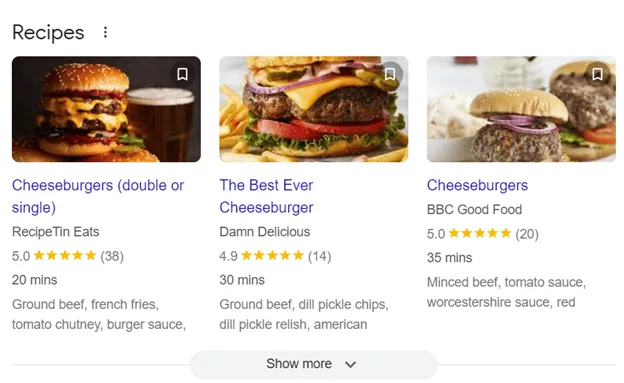
When users search for recipes online, a recipe search result appears. These results are tailored to provide quick, relevant information about recipes, including ingredients, cooking times, and often user ratings.
14. Shopping Results
A shopping result showcases products related to a user’s search query, often to facilitate an online purchase.
15. Hotel Pack
The “Hotel Pack” is a feature in Google’s search engine results pages that displays hotel listings relevant to a user’s search query, typically for searches related to lodging or accommodation in a specific area.
How to Find SERP Feature Opportunities in Your Niche
In this section, we will delve into how to discover SERP feature opportunities with keyword.com to boost your SEO strategy and establish real estate for your brand in your niche.
1. Identify SERP Features You Currently Hold
Keyword.com SERP tracker helps you easily discover if your keywords trigger a special feature on SERPs. Alongside essential features like Google Analytics integration, keyword suggestions, and more, Keyword.com shows you SERP features you rank for on the search result.
To start, sign up to keyword.com and create a new project by clicking the Add Project icon. You can choose any projects from the left drop-down if you already have an account.
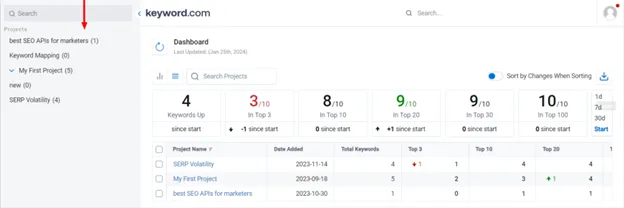
For new users, provide the required details, including your website URL, the keyword(s) you want to track, language, device (desktop or mobile), and location. Interestingly, Keyword.com allows you to import bulk keywords at once as a CSV file. Click the Add Keywords icon once you are done.
Next, scroll down to the keyword ranking table and click the SERP Featurescolumn to see features your site already secured.
The SERP feature icons are displayed in two colors: green and blue. If they show green, your site has already won that SERP feature. The blue icons show that the SERP feature is available on the search result, but another site has already secured the spot.
Note:Search results are consistently changing, so you need to stay on guard to retain your rankings. You can secure a SERP feature today and be sidelined in a jiffy. That’s why you need to keep on guard to remain relevant consistently.
You can create a spreadsheet of your keywords and the SERP feature(s) you secured on search results and track this success to know when changes occur. Since you’ve secured the spot once, there is a high chance that you win such feature(s) again for other keywords.
2. Analyze Current SERP Features for Target Keywords
In your Keyword.com dashboard, enter the keywords, and click the Add Keywords icon. You’ll get a breakdown of relevant metrics, such as the keyword search volume, CPC, and competition. Navigate to the SERP feature column to check features appearing on your keywords’ search results.
3. Identify Your Competitors’ Current SERP Features
To use the keyword.com SERP tracking software to discover your competitors’ SERP features, open the tool and enter your keywords. SERP features icons that display as blue are features available on the search result, but your competitors already secured the spot.
You can also click the Share of Voice column to see how you rank on the search result compared to your competitors as far back as 30 days.
How to Win SERP Features in Your Niche
Here are some general SEO best practices that will help you trigger SERP features for your website and keywords.
1. Understand SERP Opportunities Relevant to Your Niche
To start winning SERP features, the first thing you need to do is understand the opportunities that are specific to your niche. When you search for your target keywords, take note of the types of SERP features that appear. Are you seeing Featured Snippets, People Also Ask, Local Packs, or Product Listings? This can give you a solid idea of what kind of content Google thinks is most relevant for those queries.
Once you know which features are common for your keywords, dig deeper into search intent. For example:
- If users are looking for answers to specific questions, they’re likely triggering Featured Snippets or People Also Ask
- If the searcher is looking to make a purchase, then Google might show Product Snippets or Google Shopping Ads.
- For local businesses, it’s all about Local Packs.
By identifying the search intent, you can tailor your content to fit. For instance, if you want to show up in a Featured Snippet, structure your content with a clear and concise answer near the top of the page, often in a bullet point or numbered list.
2. Conduct Keyword Research
Use our new keyword intelligence tool to find relevant keywords for your website to trigger Google SERP features.
All you need to do is enter your seed keyword or URL, choose your preferred location, and let our tool work its magic. After a few minutes, your dashboard will be populated with a list of keywords — including their search volume and cost-per-click for ads.
Proceed by analyzing your keyword list with keyword.com to review your keywords’ search volume, competition, CPC, and other relevant metrics. Complete your research by checking the SERP features column to identify SERP features that are available for your target keyword.
Read our detailed guide on keyword research, tracking, and monitoring to learn how to find the right keywords.
3. Create High-quality Content That Properly Satisfies Search Intent
When creating your content, your goal shouldn’t be to secure a SERP feature, or you will end up ranking at the last pages of Google’s search results.
In creating helpful content documentation, Google stated thatits automated ranking systems are designed to present helpful, reliable information primarily created to benefit people, not gain search engine rankings in the top search results. This means the ranking system organically favors sites whose content primarily satisfies searchers’ intent.
Here’s how Caitlin, Content and SEO Lead at Dovetail creates quality content for Google SERP features:
To increase the likelihood our articles get SERP features, I look to closely match the search intent for the keyword in the article ( does the searcher want to read how to do something, get inspired by examples, watch a video, buy a product, etc.) When the search intent is related to informational content, I try to match it with the formatting and structure:
- The intent is to read a definition - include a 2-3 sentence definition of the keyword or topic in the first few paragraphs.
- The intent is to learn how to do something - make sure the H2s are either numbered, where applicable, or, at minimum, worded as instructions.
- The intent is to see a list of ideas or examples - ensure the examples feature as H2s and are written so they make sense if they were condensed into a bulleted list by Google in the SERPs.”
Finally, for specific niches, such as health and wellness, be sure that experts in the field write the content. Or, if that is out of budget, reach out to experts for quotes for the most valuable keywords for a chance of ranking.
5. Implement structured data
Structured data helps search engines understand the context and content of your pages. This clarity is essential for Google to consider your site for various SERP features,
For instance, providing search engines additional context about your pages’ content increases your chances of securing rich snippets. Whether it’s a recipe, a cooking technique, or a product review, structured data helps search engines understand the specifics, boosting your visibility.
Also, structured data is crucial for local businesses in optimizing Local Packs and Google Maps listings. Businesses increase their chances of appearing in these local search features by marking up information like location, hours, and contact details.
Monitor SERP Feature Rankings with Keyword.com
Keyword.com provides an accurate and reliable keyword performance monitoring tool. It shows you real-time rankings for your search terms, as well as any SERP features they are ranking for.
For example, you can see which keywords trigger AI overviews, featured snippets, and much more. This gives you a holistic view of your organic search performance — empowering you to make informed SEO decisions.
Try Keyword.com for free for 14 days!
Frequently Asked Questions on How to Win SERP Features in A Niche
Find answers to common questions about Google SERP features.
1. Is There a Tool That Can Help Identify the Most Relevant SERP Features for My Niche?
Keyword.com SERP Feature Tracker helps identify SERP features that are common in a niche. This tool analyzes search results for target keywords and shows which features appear most frequently, allowing its users to tailor their content and SEO strategies accordingly.
2. How can I Appear in Google Knowledge Panels?
To increase your business’s chances of being on a knowledge panel, ensure your brand has a strong online presence across multiple authoritative platforms, including social media, and maintain an up-to-date Google Business Profile.
3. Can Video Content Improve My Chances of Appearing in SERP Features?
Yes, video content can help you appear in video carousels and featured snippets. Best practices for video SEO include using relevant keywords in the title and description, creating high-quality content that addresses users’ search intent, and providing a transcript. Hosting videos on platforms like YouTube can also improve visibility.
5. How Often Do SERP Features Change
SERP features can change frequently as search engines continually update their algorithms. Staying updated involves regularly monitoring SEO news sources, participating in SEO communities, and using the keyword.com rank tracker to monitor changes in search results. Interestingly, its SERP tracker API pulls unlimited data from your account, transferable to your internal to drive decisions and dazzle your clients.
Periodically reviewing your site’s performance in different SERP features is also essential for adapting your strategy.