SEO ROI: What Is It and How to Measure It for Your Clients

How to measure SEO ROI remains a challenge for many SEO specialists and agencies.
SEO ROI refers to the return on investment for a business’s search engine optimization efforts. It is a way of measuring the effectiveness of SEO in terms of the revenue generated by the website. It is the amount of profit a business receives from its SEO investment compared to the cost of that investment, including money and time.
This article will delve into the nitty-gritty of SEO ROI, how to measure it, and how to create reports that cover your SEO efforts entirely for your clients.
Types of SEO ROI
The ROI of your SEO efforts can be short-term or long-term. Understanding the distinction between long-term and short-term SEO ROI is crucial for setting realistic expectations and strategies.
| Short-term SEO ROI | Long-term SEO ROI | |
| ROI Timeline | Short-term SEO can show quicker returns, but these might be less stable. The goal is to improve rankings and visibility for specific keywords quickly. | Long-term SEO requires more time to show results but typically offers more sustainable and compounding benefits. It's about creating a solid foundation to drive traffic and conversions consistently. |
| Investment | Lower compared to long-term SEO | Higher in terms of time and resources |
| Net Return | Improvement in rankings and visibility for specific keywords | Consistent traffic and conversion |
| Measurement | Measured by an immediate increase in traffic, improved search engine rankings, or a quick boost in leads or conversions directly attributable to recent SEO changes. | Measured by sustained growth in organic traffic, consistent ranking for targeted keywords, increased brand authority, and a steady rise in conversions over time. |
| Challenges | Results may not be sustainable | It takes time to see the result. It also requires higher investment. |
Importance of Measuring SEO ROI for Clients
Calculating the ROI of your SEO strategy will:
- Provide tangible evidence of how SEO contributes to the bottom line, making securing or increasing funding for SEO initiatives easier.
- Provide data for strategic SEO decision-making. You can identify the most effective SEO tactics, adjust your focus accordingly, and allocate resources to the areas that yield the highest returns.
- Demonstrate SEO value to clients and stakeholders.
How to Calculate SEO Return on Investment
The basic formula for calculating SEO ROI is:
SEO ROI= (Value of Conversions − SEO Investment) ÷ SEO Investment
-
Value of Conversions: We measure this value by increased revenue from SEO efforts. It includes direct sales from organic search traffic, lead conversions, or other quantifiable actions taken by users coming from organic search results.
-
Cost of Investment: This value includes all expenses related to SEO efforts. It encompasses the cost of hiring SEO specialists, SEO tools, content creation, and other related expenses.
Let’s have a practical example:
If your site’s conversion value for a month is $200,000
SEO Investment: $50,000 spanning across:
-
In-house SEO resources: $30,000
-
Freelancers and agencies contracts: $15,000
-
Tools: $5000
SEO ROI: ($200,000 – $50,000) ÷ $50,000
That is: $150,000 ÷ $50,000 = 3
That means you got a 3x return on your investment. So, for every $1 you invested in SEO, you got a return of $3. In other words, your ROI percentage is 300% (3 multiplied by 100).
How to Measure SEO Success
There are several ways to track the tangible results of your SEO efforts.
1. Calculate SEO ROI Using Keyword Rankings
Use keyword tracking tools to see how you rank for important search terms in the SERPs. Higher rankings mean more visibility, which converts into higher traffic and can generate revenue for your business.
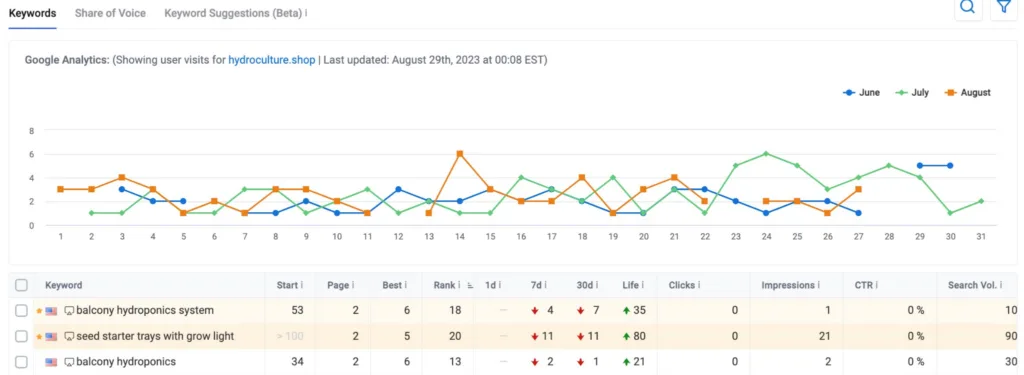
Keyword.com can help here. It’s an agency rank tracker that lets you track hundreds to thousands of keywords simultaneously. All you need to do is input your website and search terms for real-time ranking updates.
You can also access real-time updates on your website’s rankings with a historical ranking chart to gain deep insights into your keywords’ performance over time. You can also check changes in your keyword rankings in a day, 7, 30 days, and for life.
Interestingly, the new SERP features tracker helps you track keywords you rank for featured snippets, image packs, reviews, or People Also Ask.
Keyword.com also integrates with Google Search Console to provide you with more data to analyze your SEO performance thoroughly.
2. Calculate the ROI of SEO Using Traffic Generated
Inform Webworks provided a detailed formula for calculating your SEO Return on Investment from potential organic traffic.
Visitors = Search Volume (monthly/yearly) x % click-through rate
Net Returns = Visitors x Cost Per Click (CPC)
ROI = Net Returns – Cost on Investment
According to the formula, you need four metrics: keyword search volume, ranking, cost-per-click, and Google organic click-through rate breakdown by position.
Here is the breakdown of Google’s organic click-through rate:
| Positions | CTRs |
| Position 1 | 27.13% |
| Position 2 | 16.98% |
| Position 3 | 11.0% |
| Position 4 | 8.4% |
| Position 5 | 6.3% |
| Position 6 | 4.9% |
| Position 7 | 3.9% |
| Position 8 | 3.3% |
| Position 9 | 2.7% |
| Position 10 | 2.4% |
For example, if you rank #1 in the SERPs for a keyword with a monthly search volume of 880 and a CPC of $4.21, here is how to calculate your ROI:
Search Volume = 880
CPC = $4.21
CTR = 27.13% or 0.2713
Visitors = Search Volume x % click-through rate
That is: 880 x 0.2713 = 238.744
Net Returns = Visitors x Cost Per Click (CPC)
That is, 238.744 x $4.21 = $1,005 (to the nearest whole number)
If you spend $200 on SEO for that keyword, your ROI will be:
$1,005 - $200**= $805**
3. Calculate SEO ROI Using Conversion Rate
Another way to calculate SEO ROI is to track and assign value to conversions made from organic searches.
Conversion varies from business to business. For instance, conversion to an eCommerce store is the number of sales made, while a service provider measures conversion with the number of leads generated.
The best tool to track your conversions is Google Analytics (GA4)
How to Track eCommerce Conversion Values with Google Analytics
The first step to tracking eCommerce conversion data is to set up eCommerce tracking events for your site in Google Tag Manager. You can follow the step-by-step guide in Google Instructions to set it up.
After you start monitoring eCommerce events, you can access your online sales in Google Analytics.
To see these data, open your Google Analytics, check Report ➡ Monetization → E-commerce purchases
Then click the Add filtericon to check for organic traffic.
In the drop-down, click Select dimension and choose **Session source/medium.**Next, click Select match typeand choose exact matches.Lastly, click Select dimension valueand pickGoogle/organic.
Then click Apply.
Click the insights icon at the top right corner to have the complete breakdown of your conversion value.

Once you click the icon, select Ecommerce to see the revenue for different conversion values, including the trend of weekly revenue over the last 12 months, revenue by devices this year, your best-selling products, and more.
4. Track Lead Conversion Values with Google Analytics
Lead conversion differs from organic conversion.
Organic conversions are valuable actions a user takes that originate from organic search traffic. This user can transit into a lead.
Conversely, lead conversion refers to transforming a lead - a potential customer who has shown interest in your product or service - into an actual paying customer.
Having an exact figure to capture the value of your leads converted can be challenging. However, you can measure this same value by assigning a monetary figure to each lead generated.
Here is how to do this on Google Analytics:
Go to Admin➡ Events.
The next step is creating an event for each lead conversion format. It can be free trial sign-ups, form submission, etc.
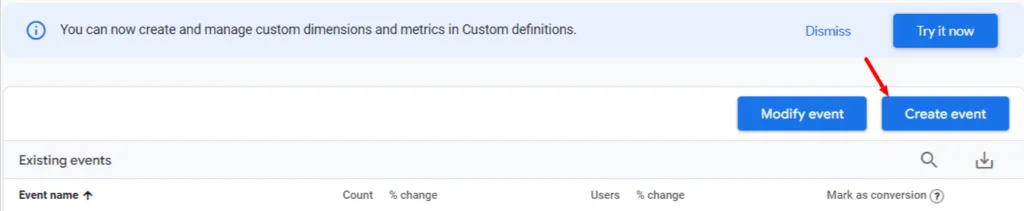
First, provide the event name.Add theparameter, **operator,**and **value.**Then click Createat the top right corner.
You will find your new event under existing events. Click its toggle under Mark as conversion. To check your event anytime, go to Report ➡ Engagements➡Conversions.
To assign a monetary value, go to your event. Under Configuration, scroll down toModify parameters.
Enter your currency type in the Parameter bar, e.g., dollar or pound. Under the New Valuefield, enter the value of each lead. If you type 100, that is 100 dollars or 100 pounds, depending on the currency you entered. Then click Save.
5. Monitor User Purchase Journey with Google Analytics
Tracking user purchase journey is another way to measure ROI. This report shows the percentage of user interactions at each funnel phase before becoming a lead or customer.
Follow Google’s step-by-step purchase journey guide to set this up.
Monitor Your Client’s SEO Performance with Keyword.com Reports
Keep your clients happy with automated keyword ranking reports that are easy to understand.
Keyword.com lets you generate real-time links that provide clients with an intuitive interface to monitor rankings, Share of Voice metrics, SERP competitors, and more.
You don’t need to spend days creating keyword ranking reports. Take Web Genius, for example. The agency went from ten people creating SEO reports to automated SEO reports — thanks to Keyword.com.
Start your free trial to create your clients’ keyword ranking reports and hit their inboxes daily with analysis that shows a corresponding profit on each of their bucks spent.